Agent A1 – Architecture and Runtime Design
🌍 Project orchestrator - Agentic AI prototype
Overview
Agent A1 is the first working prototype in a small agent framework whose purpose is learning by building.
The goal was not to create a “smart” agent, but a concrete, observable, repeatable system that demonstrates how modern LLM-based agents can be:
- controlled
- executed
- audited
- extended
- and compared across providers (OpenAI today, Gemini next)
Agent A1 performs a deliberately simple task:
moving files from one folder to another, while logging every decision and execution step.
Simplicity is a feature here.
Design Principles
The system is built around a few explicit principles:
Decision ≠ Execution
The LLM decides what should happen; deterministic code performs the action.Everything is observable
Every run produces a structured run object with inputs, outputs, timestamps, and duration.Agents are replaceable
Agent A1 (OpenAI) is intentionally built so Agent A2 (Gemini) can be dropped in with minimal changes.Infrastructure stays boring
Standard Linux, Python, Nginx, and GitHub Pages. No hidden magic.
High-Level Architecture
Agent A1 and Agent A2 share the exact same runtime pipeline: observe, decide, execute, and log. The only difference between them is the decision provider used in the “Decide” phase.
Agent A1 uses OpenAI as its language model provider, while Agent A2 is intended to use Gemini. Everything else — filesystem access, execution logic, validation, and logging — remains identical.
This design makes agent behavior comparable across providers. Differences in output quality, latency, or cost can be attributed to the model itself rather than differences in infrastructure or execution logic.
By isolating the LLM behind a stable decision interface, the system avoids vendor lock-in and enables controlled experimentation.
flowchart LR
    Browser["Browser<br/>a1.html"]
    Nginx["Nginx<br/>Basic Auth"]
    API["Agent API<br/>(FastAPI + Uvicorn)"]
    Agent["Agent A1<br/>Decision Layer"]
    OpenAI["OpenAI API"]
    FS["File System"]
    Logs["Run Logs<br/>History"]

    Browser -->|POST /api/a1/run| Nginx
    Nginx --> API
    API --> Agent
    Agent --> OpenAI
    Agent --> FS
    Agent --> Logs
Component Breakdown
Frontend (a1.html)
The frontend is intentionally minimal:
- Static HTML
- Three buttons:
- Run agent
- Show status
- Show history
- Uses
fetch()against a small REST API - Protected via Nginx basic authentication
There is no frontend framework and no state beyond what the backend returns.
Reverse Proxy (Nginx)
Nginx serves three purposes:
- Basic authentication (
.htpasswd) - TLS termination (not shown here)
- Reverse proxy to the agent API
This keeps the agent runtime fully private while still being web-accessible.
Agent API (FastAPI + Uvicorn)
The API exposes a minimal surface:
POST /api/a1/runGET /api/a1/statusGET /api/a1/history
Each request triggers or queries exactly one agent run.
Uvicorn runs the API as a long-lived service on the server.
Agent A1 Runtime
Agent A1 itself is split into four explicit phases:
1. Observe
The agent inspects the current state of the filesystem:
- source folder
- target folder
- list of files
No assumptions are made.
2. Decide (LLM)
The observed state is turned into a structured prompt and sent to the OpenAI API.
The model returns a pure decision object, for example:
1
2
3
4
5
6
{
  "status": "moved",
  "actions": [
    "Move test8.txt from source folder to target folder"
  ]
}
The LLM never touches the filesystem directly.
3. Execute (Deterministic Code)
The Python runtime:
- validates the decision
- performs the file operations
- verifies the result
If execution fails, the run is marked as failed — regardless of what the model suggested.
4. Log (Run Object)
Each execution produces one structured run record:
1
2
3
4
5
6
7
8
9
10
11
12
{
  "run_id": "7c3d2571-78ab-40f6-a8fb-02ec81ac19ee",
  "agent": "a1",
  "model": "openai:gpt-4.1-mini",
  "status": "moved",
  "input_files": ["test8.txt"],
  "actions": [
    "Moved test8.txt from source folder to target folder"
  ],
  "timestamp": "2026-01-09T10:23:48.288710+00:00",
  "duration_sec": 2.668
}
Only one log entry per run is written.
This makes the system auditable, debuggable, and comparable across agents.
Scheduling and Automation
Because Agent A1 is just a normal executable process, it can be:
- triggered via the web UI
- called via API
- executed from CLI
- scheduled via
cron
No special orchestration layer is required at this stage.
Why This Matters
This prototype demonstrates a few important ideas:
- LLMs are best used as decision engines, not executors
- Agent systems become understandable only when runs are first-class objects
- Observability is more important than intelligence in early agent systems
- Provider comparisons (OpenAI vs Gemini) are only meaningful when the surrounding system is identical
State Diagram
This diagram describes the lifecycle of a single agent instance from a runtime perspective.
An agent begins in an Idle state, waiting for a trigger. When a run is initiated — via UI, API, CLI, or scheduler — the agent transitions into the Running state.
During execution, the agent may either complete successfully or encounter an error. A successful execution returns the agent to the Idle state, ready for the next run.
If an error occurs (for example, a failed file operation or invalid decision), the agent enters an Error state. Errors are logged explicitly, but the agent does not remain stuck. After error handling or reset, the agent transitions back to Idle.
This lifecycle ensures that agent runs are isolated and that failures do not accumulate state or block future executions.
stateDiagram-v2
    [*] --> Idle

    Idle --> Running : run triggered
    Running --> Idle : success
    Running --> Error : execution failure
    Error --> Idle : reset / next run
Sequence Diagram
This diagram shows what actually happens when an agent run is triggered from the user interface.
It is deliberately concrete and chronological.
When a user clicks “Run Agent” in the browser, the request is first handled by Nginx, which performs authentication and forwards the request to the internal Agent API.
The API starts a new agent run and hands control to Agent A1, which immediately begins by observing the current state of the filesystem. This observation step is deterministic and does not involve any LLM calls.
Based on the observed state, Agent A1 constructs a structured prompt and sends it to the OpenAI API. The language model returns a decision object, describing what should be done, but not performing any action itself.
The agent runtime then executes the proposed action using deterministic Python code (for example, moving a file). Once execution is complete, a structured run object is written to the run log.
Finally, the API returns the result to the browser as a JSON response. At no point does the language model interact directly with the filesystem or infrastructure.
This separation makes the system observable, debuggable, and safe.
sequenceDiagram
    participant U as User (Browser)
    participant N as Nginx
    participant API as Agent API
    participant A as Agent A1
    participant LLM as OpenAI API
    participant FS as File System
    participant LOG as Run Log

    U->>N: Click "Run Agent"
    N->>API: POST /api/a1/run
    API->>A: start_run()
    A->>FS: observe inbox / processed
    A->>LLM: decision prompt
    LLM-->>A: decision (JSON)
    A->>FS: move file
    A->>LOG: write run object
    API-->>N: 200 OK + result
    N-->>U: JSON response
Next Steps
Planned extensions include:
- Agent A2: identical logic, powered by Gemini instead of OpenAI
- Side-by-side comparison of run quality and latency
- Multiple agents under a shared orchestrator
- More complex tasks with the same runtime pattern
Agent A1 is intentionally simple — and that is exactly why it works.
This post documents the first working milestone.
Complexity will be added only when the system itself demands it.
Agent A2 - same as A1 but with Gemini API
- Agent A2
- modified strcuture - model part (kognitive) and still only one operational agent part shared between two
- pip install openai fastapi uvicorn google-genai
- API Key from here = https://aistudio.google.com/api-keys
- Free tier (flash model not pro)
- export GEMINI_API_KEY=
1
2
3
4
5
6
7
8
cd agent_demo
export GEMINI_API_KEY=
source .venv/bin/activate
mv processed/test[1-4].txt inbox
uvicorn agent_api:app --host 127.0.0.1 --port 8000
Ctrl-c to stop service

deactivate
Test run
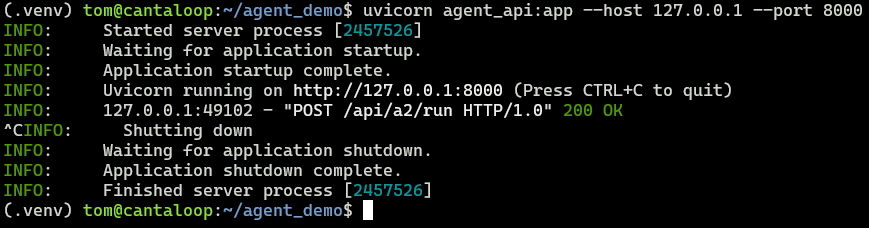 This is the look of Uvicorn service listening on port 8000 for the API
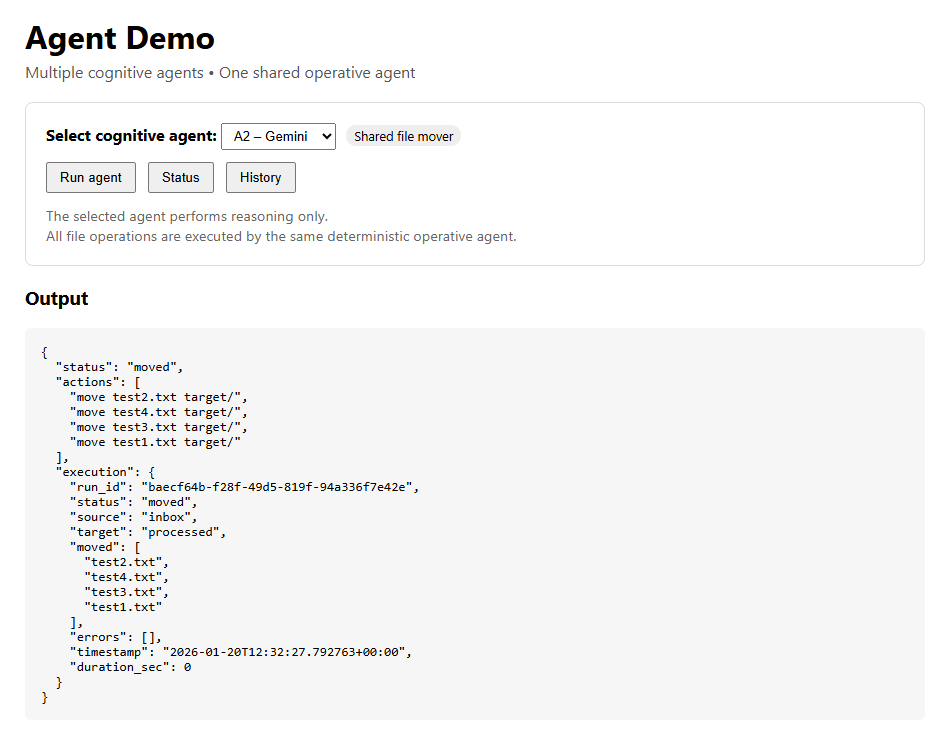
The demo frontend at orchestrator.dk/agents.html showing you can choose between A1 (OpenAI) or A2 (Gemini) demo. Result is shown. Page is password protected.
Last updated: January 2026
Source: Cantaloop Aps.